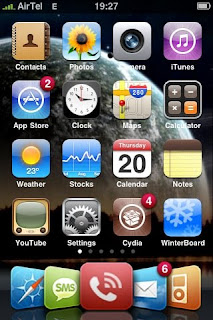
For all those who are not sure if they should jailbreak their iPhone 3G? Read here.

For those who have already done that, here is the list of apps you should have in your jailbreaked iPhone 3G.


Cycorder: One of the many things missing in iPhone is video recording facility. This app lets you record videos is easy and quick way. You can also transfer these videos to your PC. I am still to figure that out.


BiteSMS: Yet another feature we all sorely miss is forwarding messages. BiteSMS is a simple and easy to use app which lets you forward and delete messages. MySMS is another similar and feature rich app. I don’t use it because BiteSMS gives me the basic feature of forwarding sms I am looking for.

MxTube: You Tube app in iPhone lets you bookmark your favourite videos. But each time you want to check out those videos or show it to some of your friends, you need wifi connection. MxTube lets you download your favourite videos right in your iPhone. It also has search option.

Snapture: Mr. Steve, so what if you have not given me a zoom option in my iPhone camera. I now have Snapture. With Snapture you get zoom feature, colour mode feature, and burst option.

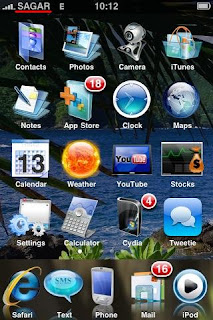
MakeItMine: This app lets you customize the carrier logo and the time to any name and number that you want. A simple and no-nonsense app. Check the screenshot below.

iSpazio Dockflow : Do you like the album cover flow feature in the iTunes? Now you can get the same look to your dock. This one is visually stunning. Check the screenshot below.


Famous Quotes Widget: If you are found of quotes then you will surely love this app. This app gives you a new quote on the lock screen every time you are about to unlock the screen.

Firefox Safari2: If you are a Firefox fan or want to give a new look to your safari browser, then this is the app you need get. It does not have any of Firefox features except for the looks.

Five Icon Dock: Ever wished you could fit in one more app to you dock? Well, your wish comes true with this five icon dock. So now stack your favourite and most used icon along with four others.

Genesis of this post: I am about to upgrade my iPhone from firmware 2.1 to 2.2.1. I did not upgrade to 2.2 bcoz I did not want to install my cydia apps all over again. So I have jotted down all the apps and themes I will have once I upgrade my iPhone.

Please note, I might have missed out of few interesting and useful apps. But this list is based on my limited knowledge and personal usage of the apps. More suggestions are always welcome.


Are you still wondering weather to jailbreak your iPhone or not? Well, here is the biggest reason you should jailbreak your iPhone. You can download tons of paid (and expensive) apps without paying a single paise (read cents). For other reasons and pros and cons of jailbreak read this.


Following are the steps to download those apps for free.

1) Open Cydia

2) Go to Manage

3) Select 'Edit' and then 'Add'

4) Entre this URL http://cydia.hackulo.us/

5) After Installation, Go to Sections in Cydia and select Hackulo.us

6) Install 'Installaous' and 'miPatch Firmware 2.2.1' one after the other.


Now you are ready to install those paid free apps. There are two ways to do this.

1) iTunes (Recommended)

Go to http://appulo.us/appdb/ and select the app which you want. (.ipa format)

After you download the app on your desktop, just add the app on your iTunes and Sync with your iPhone.

2) iPhone

Open Installous (it will open appulo.us). Now select or search the app you want to download. Once you select the download source, you will be asked to download or install. Select 'Download'
After the download is complete go to 'Download' section and install the app.

Thanks Hackulous !!!

For all the iPhone lovers who want to watch your favourite movies and TV shows, there are tons of iPhone video converters in the web sphere. However, most of these are paid, trail version or convert only limited part of the movie.

Videora iPhone Converter is a free and easy to use iPhone Video Converter. You can convert unlimited number of movies and TV shows.

It also gives you an option of choosing the video and audio quality of the movie.


Go and download Videora iPhone Converter Now and Here.

Have you bought that new iPhone and don’t know which applications to download from the App Store? Or finding it difficult and frustrating to select the best apps for the iPhone? Look no further. Given below is the list of all the applications you ‘must have’ for your iPhone. Have rated these apps based on their utility levels.

Around Me
- This app finds the nearest restaurants, cafes, pubs, movie halls, banks etc based on your current location. So let’s say you are in Bandra and you want to find out the nearest restaurants in Bandra. Just select ‘restaurants’ and it will search for all the list of all hotels in and around Bandra. It will give you the address, contact no and distance from your current location.

Utility Rating: 5/5
Price: Free

Facebook: This app does not need any explanation. If you have a Facebook account then this is a must have app on you iPhone. They have recently updated few features as well. I think they have got the best custom made app for iPhone.

Utility Rating: 5/5
Price: Free

Remote: Would it not be cool to control your iTunes library running your PC with your iPhone. This app does exactly that. It gives you complete control of your iTunes playlist, videos, audio books etc. Tough I do not know how many are going to actually use it.

Utility Rating: 5/5
Price: Free

Stanza : Arguably the best e-book reader on the iPhone. It has lot of free eBooks which you can download from the online catalogue.


Utility Rating: 4/5
Price: Free

Greetings: 123greetings.com is passé. If you want wish your friend on his birthday or sorry to your wife for the fight you had last night then this is app comes handy. There are lots of occasions for which you can send a greeting card. The quality of greeting cards is also very nice and new ones keep getting updated.

Utility Rating: 4/5
Price: Free

Backgrounds: There are tons of iPhone wallpaper sites. But how about a cool application that lets you download and save free wallpapers on your iPhone itself. This application gives you the best iPhone wallpapers across various themes like abstract, nature, cars and so on.

Utility Rating: 5/5
Price: $0.99

Facts : Did you know that the average person laughs 15 times a day? Or the average person has over 1460 dreams a year? If you are fascinated with such facts than this app is a must download. It has categories like Humans, Superstitions, Animals, Misc etc. A got app to have to pass your time during travel.

Utility Rating: 4/5
Price: Free

Picture Dialer: This app lets you dial to your loved ones by simply tapping on their picture. The picture display is just awesome and the user interface is really easy to use. This one is a must have app for your iPhone.

Utility Rating: 4/5
Price: Free

There are tons of games on the App Store (1573 Games at the time of writing this post!) … but most of the games are what I call them DIDI games (Download It and Delete It). These games are useless, waste of time, and needs to be deleted as soon as you download.

To make life easy, I am listing the most interesting and addictive games I have downloaded and played since I bought my iPhone. Most of these games are free or will costs maximum $1.99.

Application which have are labelled as ‘Lite’ connotes that it is a demo (lite) version. It is usually a free app which allows you to experience few features before you buy the main app.

Everest: Hidden Expedition: If you like solving puzzles, mysteries, jumbles etc. then this is a must have game for your iPhone. You will not put down that iPhone until you finish this game. This is an object-finding game where you race with other three contestants to climb up the highest mountain in the world: Mount Everest! With each passing stage the game becomes more and more challenging and the pictures are breath taking. This game is worth every cent!

Addictive Rating: 5 / 5
Price: $ 1.99

The Stone of Destiny: This one too is a find the hidden objects game. The difficulty level is slightly easy compared to the Everest Hidden Expedition. The graphics are quite impressive. The game has 25 levels and also many puzzling minigames.

Addictive Rating: 5 / 5
Price: $ 0.99

Sextuple Word Lite: This is a very interesting word game on the lines of Yahoo! Text Twist game. You have jumbled six letter word and you need to make as many three, four, five and six letter words as you can. Get half of the words to move to the next round. This one is a must have for the word game addicts.

Addictive Rating : 5 / 5
Price: Free

Word Freak: One more must have word game for your iPhone. This game will remain on my iPhone for a very long time. The game is similar to Cows and Bulls we play with paper and pencil game. The game will pick five letter word and you have to guess it. If the letters matching the word are in exact position then it will be marked in red colour but if the letter match the word but not in the right position it will be marked in yellow. You can also sync your scores online to feature among the Top 100 scorers.

Addictive Rating : 5 / 5
Price: Free

ESPN Cameraman: Do you remember the puzzle of finding five differences in the two pictures? Well, this one is exactly that. You have to find five mistakes in the picture, with time ticking and with only 3 hints. The pictures are simply amazing (famous sports events). You will love the thrill and speed of the game. Here too, you can sync your score online for Top 100 scorers.

Addictive Rating: 5 / 5
Price: Free

Solitaire City Lite: For all those Solitaire addicts and Spider fans this is best version to have on your iPhone. The user interface and the graphics are just too good.


Addictive Rating: 4 / 5
Price: Free

aMaze! Lite:
You think your hands are steady as a rock. Try this game. A very interesting and challenging game. You tilt and move the iPhone to make the ball pass through objects till you reach the blue marked hole.


Addictive Rating: 4 / 5
Price: Free

For all those who do not know much about iPhone hacking, here is a quick tip. Jailbreaking and Unlocking are two different things.

In 'Jailbreak' you tamper with the OS of the phone to have news apps, themes, wallpapers etc whereas in 'Unlock' you hack the phone so that it works with any other carrier of your choice. For iPhone 3G jailbreak tools are readily and freely available but hackers are yet to find a solution to unlock it. (Even if they do.. don't unlock or else you will lose your warranty).

To Jailbreak an iPhone is very simple and takes around 15-20 minutes. Please don't spend money to Jailbreak iPhone. Just follow these easy steps given on the site and be ready to install apps and change the look of my iPhone 3G. And yes, while jailbreaking the phone...if you find it is is taking time to start...don't panic!

Tutorial : http://www.iphone-hacks.com/2008/09/25/how-to-jailbreak-iphone-3g-21-with-quickpwn-21-for-windows/

I recommend you Jailbreak your phone only if you want customize the look of your iPhone with Themes, Sliders, SMS Wallpaper, Signal Bars, Battery Icon etc. or you want some (not many) interesting apps like Bite SMS (forward SMS), Cycorder and Qik (video recorder), Categories (to put app in folders) and Un Unlockable (hide the slide to unlock).

Check out the screenshots!


Here are some interesting keyboard tricks for your iPhone. These ones are easy to master and will save lot of time. So let's get started.

Always On Caps Lock
Double tap the shift button (upper arrow on left) to keep the caps lock on. To switch off this option double tap again. To do this you will have to go to settings > General > Keyboard > Enable Caps Lock On

Hold Shift Key for Caps
Another way to use caps lock is to keep holding the shift key with one thumb and typing the message with another finger. So if you want to write ‘I LOVE MY IPHONE’ just hold the shift key and keep typing it.

Type a Period
Now save time of typing a full stop at the end of every sentence. Just double tap the spacebar key at the end of the last word and you will see a a period and a space entered automatically after the letter. Certainly a Time Saver!

Auto Correction
Do you want to type words like “I’ll” or “Don’t” very quickly? Simply type ‘ill’ and press spacebar. Or just type ‘dont’ followed by spacebar to get 'don’t'. Magic!

Type the correct letter every time
A letter isn’t entered until you lift your finger off a key. So if you touch a wrong key by accident while typing, simply slide your finger to the one you meant to type. Let go when the correct letter or symbol appears.

Accept suggested word
If you want to accept a suggested word just tap spacebar. For instance, tap spacebar after typing ‘Morni’ to select suggested word 'Morning'.